# Base64
JavaScript提供两个函数来编码和解码 Base64
btoa()(opens new window):从二进制数据“字符串”创建一个 Base-64 编码的 ASCII 字符串(“btoa”应读作“binary to ASCII”)atob()(opens new window):解码通过 Base-64 编码的字符串数据(“atob”应读作“ASCII to binary”)
# 封装base64处理工具
export function base64EncodeString(str: string): string {
  if (typeof Buffer !== 'undefined' && typeof Buffer.from === 'function') {
    // node.js
    return Buffer.from(str, 'utf8').toString('base64')
  }
  const encoder = new TextEncoder()
  const bytes = encoder.encode(str)
  let binary = ''
  for (let i = 0; i < bytes.length; i++) {
    binary += String.fromCharCode(bytes[i])
  }
  return btoa(binary)
}

export class Base64Util {
  static encode(str: string): string {
    // Node.js 环境
    if (typeof Buffer !== 'undefined' && typeof Buffer.from === 'function') {
      return Buffer.from(str, 'utf8').toString('base64')
    }
    // 浏览器环境
    const encoder = new TextEncoder()
    const bytes = encoder.encode(str)

    // 处理大字符串时,避免 ...bytes 超出调用栈
    let binary = ''
    const chunkSize = 0x8000 // 每次处理 32KB
    for (let i = 0; i < bytes.length; i += chunkSize) {
      const chunk = bytes.subarray(i, i + chunkSize)
      binary += String.fromCharCode.apply(null, Array.from(chunk))
    }

    return btoa(binary)
  }

  static decode(str: string): string {
    if (typeof Buffer !== 'undefined' && typeof Buffer.from === 'function') {
      return Buffer.from(str, 'base64').toString('utf8')
    }

    const binary = atob(str)
    const length = binary.length
    const bytes = new Uint8Array(length)
    for (let i = 0; i < length; i++) {
      bytes[i] = binary.charCodeAt(i)
    }
    const decoder = new TextDecoder()
    return decoder.decode(bytes)
  }
}
2
3
4
5
6
7
8
9
10
11
12
13
14
15
16
17
18
19
20
21
22
23
24
25
26
27
28
29
30
31
32
33
34
35
36
37
38
39
40
41
42
43
44
45
46
47
48
49
50
特点:
- 跨平台(Node.js + 浏览器)。
- 支持大字符串(分块处理,避免
RangeError: Maximum call stack size exceeded)。 - 严格 UTF-8(使用
TextEncoder/TextDecoder)。
JavaScript File API (opens new window)
<input type="file" id="input">
选择多个文件,input 元素上添加 multiple 属性。
const selectedFile = document.getElementById('input').files[0];
FileList:
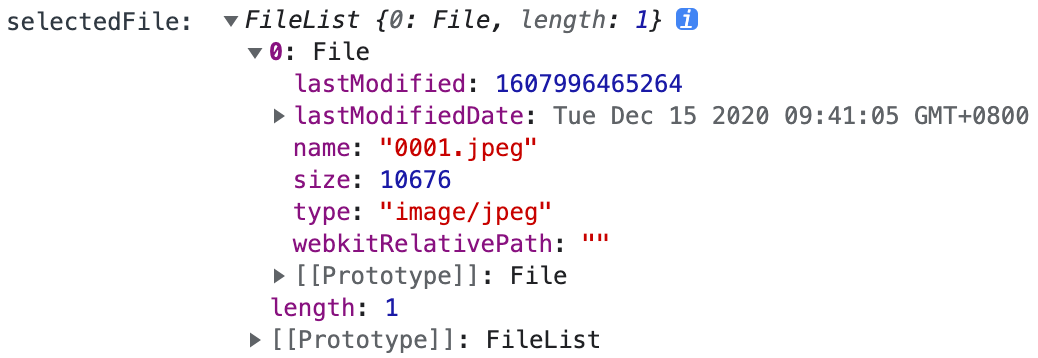
# FileReader API (opens new window)
Lets web applications asynchronously read the contents of files (or raw data buffers) stored on the user's computer, using File or Blob objects to specify the file or data to read.
FileReader 对象允许Web应用程序异步读取存储在用户计算机上的文件(或原始数据缓冲区)的内容,使用 File (opens new window) 或 Blob (opens new window) 对象指定要读取的文件或数据。
# FileReader.readAsDataURL()
readAsDataURL方法会读取指定的 Blob或File对象。
# 读取文件并预览
大致流程是创建一个img元素,通过FileReader 的 readAsDataURL读取Blob | File 为dataUrl(即base64字符串)
img元素的src赋值为base64。
<div>
      请选择图片
      <input
        type="file"
        name="uploadPic"
        id="uploadPic"
        onchange="handleFiles()"
      />
      <div id="preview"></div>
    </div>
    <script>
      const preview = document.querySelector("#preview");
      function handleFiles() {
        const selectedFile = document.getElementById("uploadPic").files[0];
        console.log("selectedFile: ", selectedFile);
        let img = document.createElement("img");
        img.classList.add("obj");
        img.file = selectedFile;
        preview.appendChild(img);

        const reader = new FileReader();
        // reader.onload = (function (aImg) {
        //   return function (e) {
        //     aImg.src = e.target.result;
        //   };
        // })(img);
        reader.onload = (e) => {
          console.log("e: ", e);
          img.src = e.target.result;
        };
        reader.readAsDataURL(selectedFile);
      }
    </script>
2
3
4
5
6
7
8
9
10
11
12
13
14
15
16
17
18
19
20
21
22
23
24
25
26
27
28
29
30
31
32
33
# FileReader.onload
当 FileReader 读取文件的方式为 readAsArrayBuffer (opens new window), readAsBinaryString (opens new window), readAsDataURL (opens new window) 或者 readAsText (opens new window) 的时候,会触发一个 load (en-US) 事件。
# FileReader.readAsText
readAsText 方法可以将 Blob (opens new window) 或者 File (opens new window) (opens new window)对象转根据特殊的编码格式转化为内容(字符串形式)
function App() {

  function handleFiles([file]) {
    console.log('file: ', file);
    const reader = new FileReader()
    reader.onload = (e)=>{
      console.log('result',e.target.result);
    }
    // reader.readAsDataURL(file)
    reader.readAsText(file)
  }
  return (
    <div>
      <label>请选择图片</label>
      <input type='file' id="uploadPic" onChange={(e)=> handleFiles(e.target.files)}></input>
    </div>
  )
}
2
3
4
5
6
7
8
9
10
11
12
13
14
15
16
17
18
# Blob,ArrayBuffer、File、FileReader和FormData的区别 (opens new window)
blob 全称binary large object,表示二进制大对象